While Kubernetes is far more than just a server, thinking about it as a REST API server is incredibly helpful for understanding how to interact with cluster resources.
In this post I’ll explore how we can interact with Kubernetes as a server and how to discover its API.
Proxy
To make it easier for you to see how Kubernetes is a server, run:
> kubectl proxy
Now we can call the API to navigate through its endpoints. Calling the root you can see all available paths:
> curl localhost:8001
{
  "paths": [
    "/.well-known/openid-configuration",
    "/api",
    "/api/v1",
    "/apis",
    "/apis/",
    "/apis/acme.cert-manager.io",
    "/apis/acme.cert-manager.io/v1",
    "/apis/admissionregistration.k8s.io",
    "/apis/admissionregistration.k8s.io/v1",
    "/apis/apiextensions.k8s.io",
    "/apis/apiextensions.k8s.io/v1",
    "/apis/apiregistration.k8s.io",
    "/apis/apiregistration.k8s.io/v1",
    "/apis/apps",
    "/apis/apps/v1",
    "/apis/authentication.k8s.io",
    "/apis/authentication.k8s.io/v1",
    "/apis/authorization.k8s.io",
    // ...
}
The APIs list all their versions calling /apis:
> curl localhost:8001/apis
{
  "kind": "APIGroupList",
  "apiVersion": "v1",
  "groups": [
    {
      "name": "apiregistration.k8s.io",
      "versions": [
        {
          "groupVersion": "apiregistration.k8s.io/v1",
          "version": "v1"
        }
      ],
      "preferredVersion": {
        "groupVersion": "apiregistration.k8s.io/v1",
        "version": "v1"
      }
    },
    {
      "name": "apps",
      "versions": [
        {
          "groupVersion": "apps/v1",
          "version": "v1"
        }
      ],
      "preferredVersion": {
        "groupVersion": "apps/v1",
        "version": "v1"
      }
    },
    {
      "name": "events.k8s.io",
      "versions": [
        {
          "groupVersion": "events.k8s.io/v1",
          "version": "v1"
        }
      ],
      "preferredVersion": {
        "groupVersion": "events.k8s.io/v1",
        "version": "v1"
      }
    },
    // ... collapsed for readability
  ]
}
Picking any of the group versions there will show you more information about the particular resource:
> curl localhost:8001/events.k8s.io/v1
{
  "kind": "APIResourceList",
  "apiVersion": "v1",
  "groupVersion": "events.k8s.io/v1",
  "resources": [
    {
      "name": "events",
      "singularName": "event",
      "namespaced": true,
      "kind": "Event",
      "verbs": [
        "create",
        "delete",
        "deletecollection",
        "get",
        "list",
        "patch",
        "update",
        "watch"
      ],
      "shortNames": [
        "ev"
      ],
      "storageVersionHash": "r2yiGXH7wu8="
    }
  ]
}
If you’ve configured users, roles and role_bindings you’ll find the payload familiar (and useful). For each of the resource listed, you get a path and the CRUD + other operations you can perform against that particular resource.
Let’s see what you get with statefulsets
> curl localhost:8001/apis/apps/v1/statefulsets
{
  "kind": "StatefulSetList",
  "apiVersion": "apps/v1",
  "metadata": {
    "resourceVersion": "1027297"
  },
  "items": [
    {
      "metadata": {
        "name": "minitube-nats",
        "namespace": "default",
        "uid": "6815e412-36f6-488b-87e5-19a22ef4ca1d",
        "resourceVersion": "1025766",
        "generation": 1,
        "creationTimestamp": "2026-02-23T15:42:03Z",
        "labels": {
          "app.kubernetes.io/component": "nats",
          "app.kubernetes.io/instance": "minitube",
          "app.kubernetes.io/managed-by": "Helm",
          "app.kubernetes.io/name": "nats",
          "app.kubernetes.io/version": "2.12.4",
          "helm.sh/chart": "nats-2.12.4"
        },
        "annotations": {
          "meta.helm.sh/release-name": "minitube",
          "meta.helm.sh/release-namespace": "default"
        },
        "managedFields": [
          {
            "manager": "helm",
            "operation": "Apply",
            "apiVersion": "apps/v1",
            "time": "2026-02-23T15:42:03Z",
            "fieldsType": "FieldsV1",
            "fieldsV1": {
              "f:metadata": {
                "f:annotations": {
                  "f:meta.helm.sh/release-name": {},
                  "f:meta.helm.sh/release-namespace": {}
                },
                "f:labels": {
                  "f:app.kubernetes.io/component": {},
                  "f:app.kubernetes.io/instance": {},
                  "f:app.kubernetes.io/managed-by": {},
                  "f:app.kubernetes.io/name": {},
                  "f:app.kubernetes.io/version": {},
                  "f:helm.sh/chart": {}
                }
              },
              "f:spec": {
                "f:podManagementPolicy": {},
                "f:replicas": {},
                "f:selector": {},
    // ...
  ]
}
If your resource has a get verb you can call it also directly:
> curl localhost:8001/apis/apps/v1/namespaces/default/statefulsets/minitube-nats
There’s a lot of interesting information there about Kubernetes internals. The point of this post is not to deep dive, but simply to give you idea what hides below the surface.
When you handle your yaml configuration files, you’re really just managing a json payload, that is only a UI for the go structs used internally.
Resources
Proxying the API server and navigating through their endpoints is not the easiest way to get information about what resources you have available and how you can configure them. There’s an extension to kubectl which makes that much easier:
> kubectl api-resources
NAME                                SHORTNAMES   APIVERSION                          NAMESPACED   KIND
bindings                                         v1                                  true         Binding
componentstatuses                   cs           v1                                  false        ComponentStatus
configmaps                          cm           v1                                  true         ConfigMap
endpoints                           ep           v1                                  true         Endpoints
events                              ev           v1                                  true         Event
limitranges                         limits       v1                                  true         LimitRange
namespaces                          ns           v1                                  false        Namespace
nodes                               no           v1                                  false        Node
persistentvolumeclaims              pvc          v1                                  true         PersistentVolumeClaim
persistentvolumes                   pv           v1                                  false        PersistentVolume
pods                                po           v1                                  true         Pod
podtemplates                                     v1                                  true         PodTemplate
replicationcontrollers              rc           v1                                  true         ReplicationController
resourcequotas                      quota        v1                                  true         ResourceQuota
secrets                                          v1                                  true         Secret
As you see, Kubernetes has a resource representing it’s resources. Extensibility is builtin to it’s core. You can create or override existing resources with your own CRDs as long as you adhere to the API model.
I’ll go over how to so in a future post, for now let’s add the last piece of the puzzle on how you can get information about a particular API you need to use.
OpenAPI
The previous post in this series showed how all objects have the same structure (with few exceptions): kind, version, metadata and spec.
We saw how to get information about the kind and version. Now the missing piece is to look at spec.
You may have noticed on the first payload that there is a /openapi endpoint. Let’s see what is returned by calling it:
> curl localhost:8001/openapi/v3
{
  "paths": {
    ".well-known/openid-configuration": {
      "serverRelativeURL": "/openapi/v3/.well-known/openid-configuration?hash=758874B735BE352ADB2435128562FBA15E47F7D831555B7E037CDA469B398FC68EF1D2487E682C1FCDA53AD423C241FDEC0B633B991EE1E9A0A7D9DBEBDC4B2C"
    },
    "api": {
      "serverRelativeURL": "/openapi/v3/api?hash=9824AD58C82843B6E7311C1AA95512C8FBFAB4D24F3F338F88891EC2B9F06DF7234B3BA2E85370E209438CFFD9E7F4C76CF470A02BA1DB530A3C564094B3DA41"
    },
    "api/v1": {
      "serverRelativeURL": "/openapi/v3/api/v1?hash=79E2EAA6709FB44429DF0C2392F2A86D668A2100DB82CDEDDE9D23A776092AE2DDB903E9D03125803FEE7F658A05B5009BB3379FF59A7485B6B774B2C216C3CD"
    },
    "apis": {
      "serverRelativeURL": "/openapi/v3/apis?hash=9546B06017367CC9DA46D55E996D14D12E67EB2DD9EF0027226FCCA371552E9E6C546A56290D853D6E46DC56853542BA2BB247833A008FDD232E3370CA7CCEA5"
    },
    // ...
}
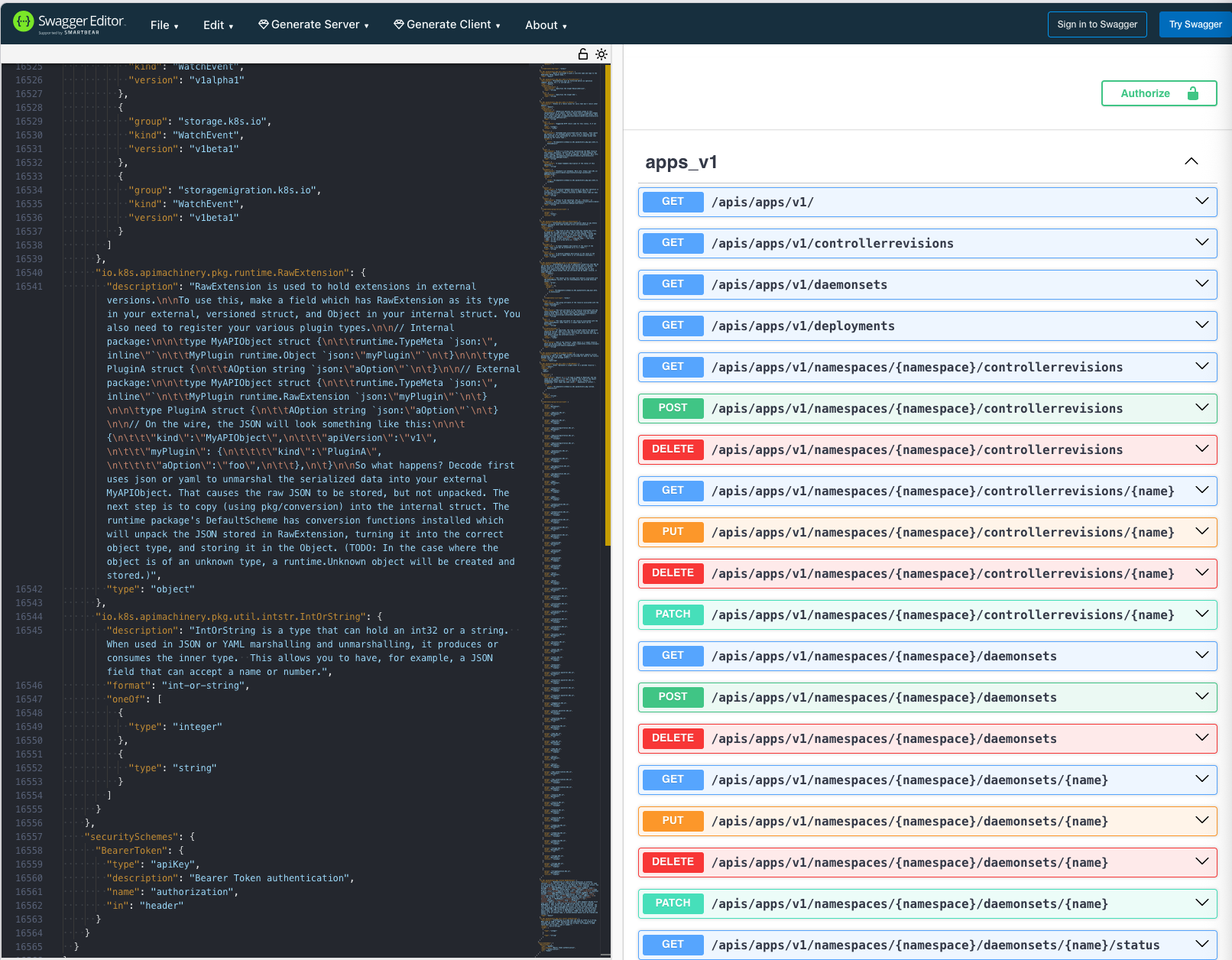
Every single resource in Kubernetes has an OpenAPI specification which can use as reference on top of it. You can see all of them by calling the endpoints and you could even copy paste the specification to visualize it in any OpenAPI UI available online:
> curl localhost:8001/openapi/v3/apis/apps/v1
{
  "openapi": "3.0.0",
  "info": {
    "title": "Kubernetes",
    "version": "1.35"
  },
  "paths": {
    "/apis/apps/v1/": {
      "get": {
        "tags": [
          "apps_v1"
        ],
        "description": "get available resources",
        "operationId": "getAppsV1APIResources",
        "responses": {
          "200": {
            "description": "OK",
            "content": {
              "application/json": {
                "schema": {
                  "$ref": "#/components/schemas/io.k8s.apimachinery.pkg.apis.meta.v1.APIResourceList"
                }
              },
              "application/vnd.kubernetes.protobuf": {
                "schema": {
                  "$ref": "#/components/schemas/io.k8s.apimachinery.pkg.apis.meta.v1.APIResourceList"
                }
              },
              "application/yaml": {
                "schema": {
                  "$ref": "#/components/schemas/io.k8s.apimachinery.pkg.apis.meta.v1.APIResourceList"
                }
              }
            }
          },
          "401": {
            "description": "Unauthorized"
          }
        }
      }
  // ...
}
Here’s an example of what copy/pasting the payload get’s you on editor.swagger.io:
That’s it for now. I hope this has provided you with a new perspective on how you can use Kubernetes. On the next post I’ll go over the tools we have available to set up an API extension.