While Kubernetes is far more than just a server, thinking of it as a REST API server is incredibly helpful for understanding how to interact with cluster resources.
In this post, I’ll explore how we can interact with Kubernetes as a server and how to discover its API.
Proxy
To make it easier for you to see how Kubernetes functions as a server, run:
> kubectl proxy
Now we can call the API to navigate through its endpoints. Calling the root endpoint shows all available paths:
> curl localhost:8001
{
  "paths": [
    "/.well-known/openid-configuration",
    "/api",
    "/api/v1",
    "/apis",
    "/apis/",
    "/apis/acme.cert-manager.io",
    "/apis/acme.cert-manager.io/v1",
    "/apis/admissionregistration.k8s.io",
    "/apis/admissionregistration.k8s.io/v1",
    "/apis/apiextensions.k8s.io",
    "/apis/apiextensions.k8s.io/v1",
    "/apis/apiregistration.k8s.io",
    "/apis/apiregistration.k8s.io/v1",
    "/apis/apps",
    "/apis/apps/v1",
    "/apis/authentication.k8s.io",
    "/apis/authentication.k8s.io/v1",
    "/apis/authorization.k8s.io",
    // ...
}
The APIs list all their versions by calling /apis:
> curl localhost:8001/apis
{
  "kind": "APIGroupList",
  "apiVersion": "v1",
  "groups": [
    {
      "name": "apiregistration.k8s.io",
      "versions": [
        {
          "groupVersion": "apiregistration.k8s.io/v1",
          "version": "v1"
        }
      ],
      "preferredVersion": {
        "groupVersion": "apiregistration.k8s.io/v1",
        "version": "v1"
      }
    },
    {
      "name": "apps",
      "versions": [
        {
          "groupVersion": "apps/v1",
          "version": "v1"
        }
      ],
      "preferredVersion": {
        "groupVersion": "apps/v1",
        "version": "v1"
      }
    },
    {
      "name": "events.k8s.io",
      "versions": [
        {
          "groupVersion": "events.k8s.io/v1",
          "version": "v1"
        }
      ],
      "preferredVersion": {
        "groupVersion": "events.k8s.io/v1",
        "version": "v1"
      }
    },
    // ... collapsed for readability
  ]
}
Picking any of the group versions will show more information about that particular resource:
> curl localhost:8001/events.k8s.io/v1
{
  "kind": "APIResourceList",
  "apiVersion": "v1",
  "groupVersion": "events.k8s.io/v1",
  "resources": [
    {
      "name": "events",
      "singularName": "event",
      "namespaced": true,
      "kind": "Event",
      "verbs": [
        "create",
        "delete",
        "deletecollection",
        "get",
        "list",
        "patch",
        "update",
        "watch"
      ],
      "shortNames": [
        "ev"
      ],
      "storageVersionHash": "r2yiGXH7wu8="
    }
  ]
}
If you’ve configured users, roles, and role bindings, you’ll find this payload familiar (and useful). For each resource, you get a path and the CRUD plus other operations you can perform against it.
Let’s see what you get with statefulsets:
> curl localhost:8001/apis/apps/v1/statefulsets
{
  "kind": "StatefulSetList",
  "apiVersion": "apps/v1",
  "metadata": {
    "resourceVersion": "1027297"
  },
  "items": [
    {
      "metadata": {
        "name": "minitube-nats",
        "namespace": "default",
        "uid": "6815e412-36f6-488b-87e5-19a22ef4ca1d",
        "resourceVersion": "1025766",
        "generation": 1,
        "creationTimestamp": "2026-02-23T15:42:03Z",
        "labels": {
          "app.kubernetes.io/component": "nats",
          "app.kubernetes.io/instance": "minitube",
          "app.kubernetes.io/managed-by": "Helm",
          "app.kubernetes.io/name": "nats",
          "app.kubernetes.io/version": "2.12.4",
          "helm.sh/chart": "nats-2.12.4"
        },
        "annotations": {
          "meta.helm.sh/release-name": "minitube",
          "meta.helm.sh/release-namespace": "default"
        },
        "managedFields": [
          {
            "manager": "helm",
            "operation": "Apply",
            "apiVersion": "apps/v1",
            "time": "2026-02-23T15:42:03Z",
            "fieldsType": "FieldsV1",
            "fieldsV1": {
              "f:metadata": {
                "f:annotations": {
                  "f:meta.helm.sh/release-name": {},
                  "f:meta.helm.sh/release-namespace": {}
                },
                "f:labels": {
                  "f:app.kubernetes.io/component": {},
                  "f:app.kubernetes.io/instance": {},
                  "f:app.kubernetes.io/managed-by": {},
                  "f:app.kubernetes.io/name": {},
                  "f:app.kubernetes.io/version": {},
                  "f:helm.sh/chart": {}
                }
              },
              "f:spec": {
                "f:podManagementPolicy": {},
                "f:replicas": {},
                "f:selector": {},
    // ...
  ]
}
If your resource has a get verb, you can call it directly:
> curl localhost:8001/apis/apps/v1/namespaces/default/statefulsets/minitube-nats
There’s a lot of interesting information about Kubernetes internals hidden there. This post isn’t a deep dive, but simply shows you what exists below the surface.
When you manage YAML configuration files, you’re really just managing a JSON payload with a UI for the Go structs used internally.
Resources
Proxying the API server and navigating through endpoints isn’t the easiest way to get information about available resources and how to configure them. There’s a kubectl extension that makes this much easier:
> kubectl api-resources
NAME                                SHORTNAMES   APIVERSION                          NAMESPACED   KIND
bindings                                         v1                                  true         Binding
componentstatuses                   cs           v1                                  false        ComponentStatus
configmaps                          cm           v1                                  true         ConfigMap
endpoints                           ep           v1                                  true         Endpoints
events                              ev           v1                                  true         Event
limitranges                         limits       v1                                  true         LimitRange
namespaces                          ns           v1                                  false        Namespace
nodes                               no           v1                                  false        Node
persistentvolumeclaims              pvc          v1                                  true         PersistentVolumeClaim
persistentvolumes                   pv           v1                                  false        PersistentVolume
pods                                po           v1                                  true         Pod
podtemplates                                     v1                                  true         PodTemplate
replicationcontrollers              rc           v1                                  true         ReplicationController
resourcequotas                      quota        v1                                  true         ResourceQuota
secrets                                          v1                                  true         Secret
As you can see, Kubernetes has a resource representing its resources. Extensibility is built into its core. You can create or override existing resources with your own CRDs as long as you adhere to the API model.
I’ll cover how to do this in a future post. For now, let’s add the last piece: how to get information about a particular API you need to use.
OpenAPI
Previous posts showed how all objects share the same structure (with few exceptions): kind, version, metadata, and spec.
We saw how to get information about kind and version. Now the missing piece is looking at spec.
You may have noticed a /openapi endpoint in the first payload. Let’s see what it returns:
> curl localhost:8001/openapi/v3
{
  "paths": {
    ".well-known/openid-configuration": {
      "serverRelativeURL": "/openapi/v3/.well-known/openid-configuration?hash=758874B735BE352ADB2435128562FBA15E47F7D831555B7E037CDA469B398FC68EF1D2487E682C1FCDA53AD423C241FDEC0B633B991EE1E9A0A7D9DBEBDC4B2C"
    },
    "api": {
      "serverRelativeURL": "/openapi/v3/api?hash=9824AD58C82843B6E7311C1AA95512C8FBFAB4D24F3F338F88891EC2B9F06DF7234B3BA2E85370E209438CFFD9E7F4C76CF470A02BA1DB530A3C564094B3DA41"
    },
    "api/v1": {
      "serverRelativeURL": "/openapi/v3/api/v1?hash=79E2EAA6709FB44429DF0C2392F2A86D668A2100DB82CDEDDE9D23A776092AE2DDB903E9D03125803FEE7F658A05B5009BB3379FF59A7485B6B774B2C216C3CD"
    },
    "apis": {
      "serverRelativeURL": "/openapi/v3/apis?hash=9546B06017367CC9DA46D55E996D14D12E67EB2DD9EF0027226FCCA371552E9E6C546A56290D853D6E46DC56853542BA2BB247833A008FDD232E3370CA7CCEA5"
    },
    // ...
}
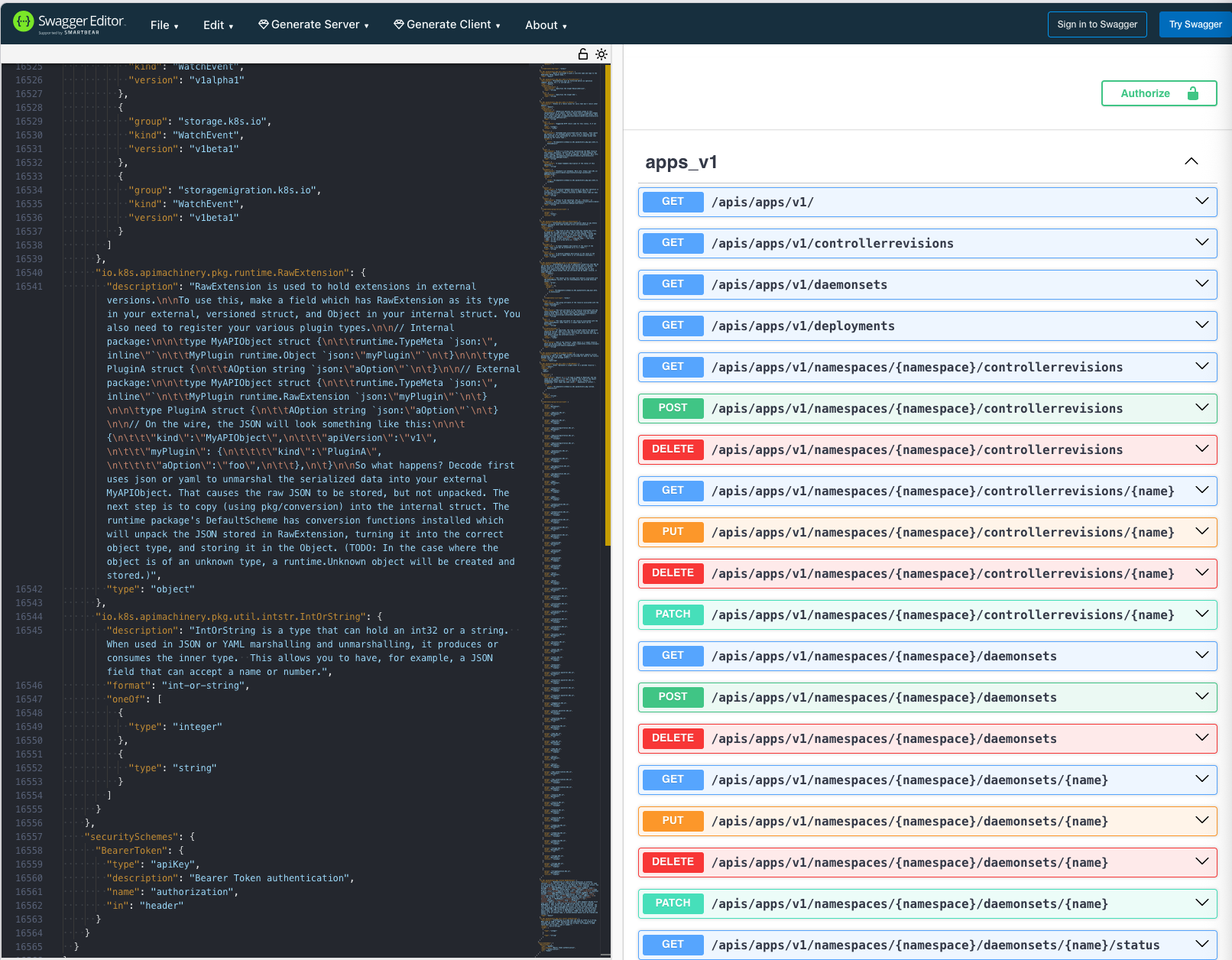
Every single resource in Kubernetes has an OpenAPI specification you can use as reference. You can see all of them by calling these endpoints, and you could even copy-paste the specification into any online OpenAPI UI to visualize it:
> curl localhost:8001/openapi/v3/apis/apps/v1
{
  "openapi": "3.0.0",
  "info": {
    "title": "Kubernetes",
    "version": "1.35"
  },
  "paths": {
    "/apis/apps/v1/": {
      "get": {
        "tags": [
          "apps_v1"
        ],
        "description": "get available resources",
        "operationId": "getAppsV1APIResources",
        "responses": {
          "200": {
            "description": "OK",
            "content": {
              "application/json": {
                "schema": {
                  "$ref": "#/components/schemas/io.k8s.apimachinery.pkg.apis.meta.v1.APIResourceList"
                }
              },
              "application/vnd.kubernetes.protobuf": {
                "schema": {
                  "$ref": "#/components/schemas/io.k8s.apimachinery.pkg.apis.meta.v1.APIResourceList"
                }
              },
              "application/yaml": {
                "schema": {
                  "$ref": "#/components/schemas/io.k8s.apimachinery.pkg.apis.meta.v1.APIResourceList"
                }
              }
            }
          },
          "401": {
            "description": "Unauthorized"
          }
        }
      }
  // ...
}
Here’s an example of what copy-pasting the payload gets you on editor.swagger.io:
That’s it for now. I hope this provided you with a new perspective on how you can use Kubernetes. In the next post, I’ll cover the tools available for API extensions.