Welcome to the first post on my Kafka Series. Here I’ll go over my learnings from writing Kafka from scratch in Rust. Something to keep in mind while reading through this articles. I’m by no means a Kafka or Rust expert. The whole point of this project was to improve my knowledge in both these areas. I’ve come a long way, but still have a long way to go. If you notice anything wrong or that you believe would significantly improve my code or the project, I’d love to hear from you either by mail or by opening an issue in this repo.
Storage
You might have heard or read the expressions distributed log, log on steroids, glorified log in disk. Whenever systems are complex, folks love to summarize them with easy-to-understand analogies. Kafka is such a case. It grew to become quite a complex system, specially because of the work you have to do around its design (more on this later), but at the core, Kafka is really an append-only log on disk. It comes with a lot of optimizations which we’ll go over, but it’s easy to think about Kafka as just that (for now).
Log
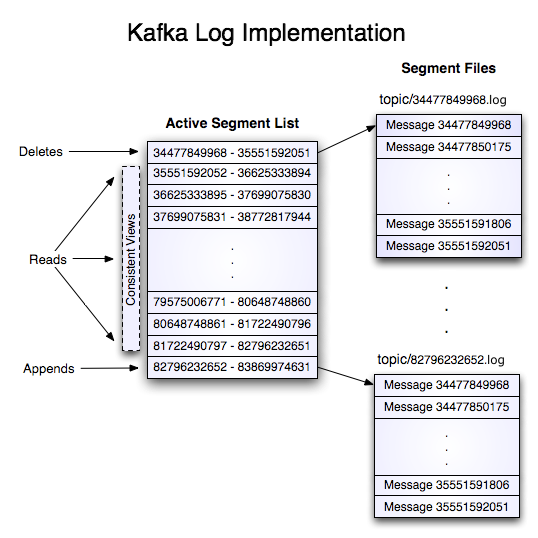
Let’s start by looking into the files on disk. Persistence in Kafka happens on disk. You have .log files, each with 20 digits representing the first offset you can find inside the log. By default Kafka will create new log files for every 1 GB of data you’ve stored in each one, but this is tweakable. If you change that value to a few bytes you’ll see each RecordBatch entry in an individual file, and if you change it to more, everything will be in a single 00000000000000000000.log file.
We’ll go over how a RecordBatch looks like and the Records inside of it in a second. First, let’s analyze how Kafka stores them inside these log files. As mentioned above, the log is append-only, so you just attach the bytes of a batch at the end of a file, never changing its order. All previously written bytes are immutable. That way you can have very efficient interactions with the OS kernel, to just have a read pointer that jumps to a specific offset, and a pointer at the end to write new batches as they come along.
Index
Assuming you have a single file, a read operation could simply jump offset by offset until reaching the desired record (batch). If we imagine doing that every time, it’s not quite efficient. A better way is to perform binary search over the offsets to find the closest location. Since each record has variable size, we can’t really perform binary search, because a jump front or back can skip 1 or n records. Thus, we introduce an index file. This file keeps fixed-sized entries containing both the offset and the physical byte position in the log file. In my case, I represented both as 8 byte integers, making it easy to skip the index file for n 16 bytes front and back.
This index file does not duplicate every entry with an associated index on the index file. Instead it keeps a sparse index. For every m bytes (defaults to 4096) it creates a new index entry. This ends up being quite efficient for the following reasons: we don’t abuse index storage, making binary search even cheaper, and we perform linear search over the m bytes, since sequential data can be scanned very efficiently if it fits in the CPU cache.
Here are the steps to locate an offset:
- You perform binary search to find the closest starting offset (it’s in the file name).
- You perform binary search over the sparse indexes.
- You perform linear search starting from the closest index, by:
- Reading the offset + batch length.
- Skipping batch length until next offset.
- Stopping once offset matches target.
Record Batch
Now that we understand how finding an offset works, we actually need an additional step not mentioned above. What is found inside the log is actually a batch of records. You have the first offset inside that batch and the number of records inside of it. The reason Kafka uses batches as much as possible is to optimize data transfer over the wire and kernel syncs to write data to disk. Instead of writing individual records, Kafka expects producers to accumulate them, either by time or by max bytes, and send them combined to the broker.
Continuing from the search path referred above, once we find the matching batch, there’s an additional linear iteration (similar to above) and Kafka returns a partial batch starting from the requested offset.
It’s important to note that Kafka never reads a single record. Since Kafka is optimized to work with batches, it also always returns at least the partial batch. It also includes the next batches as long as they fit inside a defined max bytes.
Most of the times the batch is compressed. As of now, there are only 4 compression algorithms it supports (gzip, snappy, lz4, zstd). The batch has all needed metadata over the compressed bytes as well as an integrity checksum (CRC-32C).
Here’s how a batch looks in bytes:
batchLength: int32
partitionLeaderEpoch: int32
magic: int8 (current magic value is 2)
crc: uint32
attributes: int16
    bit 0~2:
        0: no compression
        1: gzip
        2: snappy
        3: lz4
        4: zstd
    bit 3: timestampType
    bit 4: isTransactional (0 means not transactional)
    bit 5: isControlBatch (0 means not a control batch)
    bit 6: hasDeleteHorizonMs (0 means baseTimestamp is not set as the delete horizon for compaction)
    bit 7~15: unused
lastOffsetDelta: int32
baseTimestamp: int64
maxTimestamp: int64
producerId: int64
producerEpoch: int16
baseSequence: int32
recordsCount: int32
records: [Record]
Record
Finally, we have our smallest element in storage, namely the Record itself. It looks like this:
length: varint
attributes: int8
    bit 0~7: unused
timestampDelta: varlong
offsetDelta: varint
keyLength: varint
key: byte[]
valueLength: varint
value: byte[]
headersCount: varint
Headers => [Header]
And the RecordHeader:
headerKeyLength: varint
headerKey: String
headerValueLength: varint
Value: byte[]
You might have noticed that Kafka either has numeric values of fixed size bytes, or byte arrays to represent dynamic data, like keys and values. Kafka explicitly opts for byte representation instead of Strings, JSON, etc., because it works with any format you build on top of it. Part of the complexity of using Kafka is that you have to do all the work above, like choosing a consistent representation, perform serialization, etc.
Other
If you’ve looked into a storage folder of your Kafka broker you have probably seen other files as well. Each log file comes with other extensions for the same name:
00000000000000000000.log
00000000000000000000.index
00000000000000000000.timeindex
00000000000000000000.snapshot
I’m intentionally skipping the other two files, they are useful to find offsets inside a log segment for other types of searches, namely time-based and transactional references. I’ll leave those topics for you to explore.
Folders
Finally, we need a logical way to combine the log segments into a single location. Kafka creates folders based on topic plus partition. I won’t explain how the partitions work, because these are designed around consumer parallelism. I’ll go over the mechanics of that in a future blog post.
I hope you enjoyed. If you have any questions, as mentioned above, reach out, or read the open source documentation, which provides a very clear explanation of all these mechanics: docs.